

On-Page SEO 2018 | Tips, Techniques & Ranking Factors [Checklist]

by Traffitise
Are you just starting to blog? OR have your own site running for a while?
If you have been blogging for a while then you should know that On-Page SEO has become more important than ever before.
And I believe you know that higher your pages rank on search engines like Google, Yahoo, Bing etc., the more traffic your site is likely to get. And yeah, More Traffic = More Sales = More Money. 🙂 🙂
But here we’re only going to talk about Google. Coz you now that Google is the King of all the search engines.
According to Statista,
Ever since the introduction of Google Search in 1997, the worldwide market share of all search engines has been rather lopsided. Google has dominated the search engine market, maintaining an 89.06 percent market share as of January 2017.”
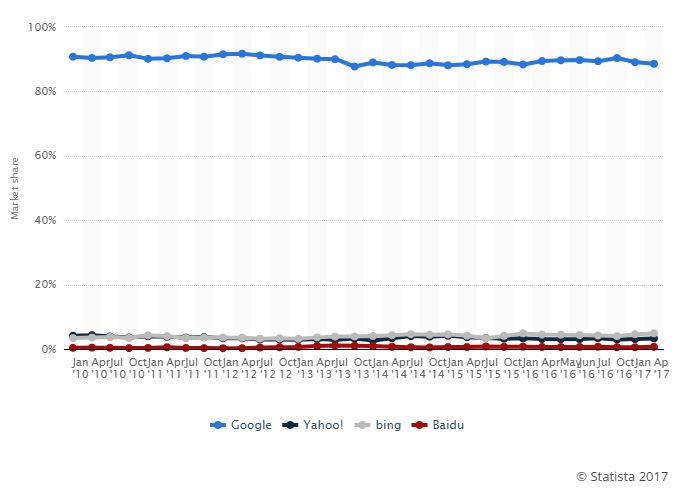
statista-google-market-share
We all know that Google makes more than 500 updates to their algorithms a year. These algorithms are evolving all the time. The technique that used to work 2-3 years ago, don’t work now. Back in the day, you could rank your site just by stuffing keywords here and there. You could rank with just 300 words of content with no proper optimization. You could easily manipulate search engine rankings.
Thanks to Google, now we have Google’s algorithms like Panda, Hummingbird, Rank Brain, Semantic Search which helps us optimize our webpage for better user experience. So now you should no longer worry about optimizing your page for a specific keyword and just let Google figure out what your page is all about. Just make sure you are writing for users, not search engines.
SEO can be split up into two separate categories; On-Page SEO & Off-Page SEO. But here we’re going to discuss On-Page SEO.
What is On-Page SEO?
In simple words, the work you do on your web pages is On-Page SEO. But there is more to it.
According to Moz,
“On-Page SEO is the practice of optimizing individual web pages to rank higher and earn more relevant traffic in search engines. On-page refers to both the content and HTML source code of a page that can be optimized, as opposed to off-page SEO which refers to links and other external signals.”
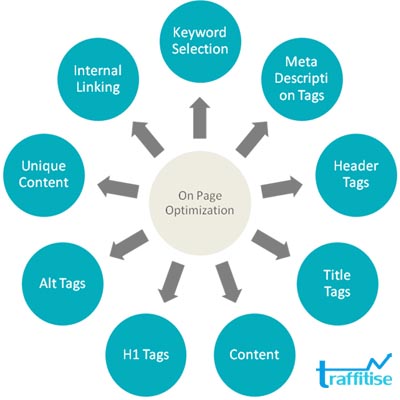
When optimizing the site you should take care of these four things:
- P = Popularity
- A = Authority
- R = Relevancy
- T = Trust
And ask yourself these four questions:
- How popular is my site in the eyes of Google?
- How authoritative is my site in the eyes of Google?
- How relevant is my site compared to other websites competing for that particular keyword?
- How trustworthy is my site in Google’s eyes?
Popularity, Authority, Relevancy, Trust covers all the components and ranking factors required to rank a site. It covers both on and off page signals like content, links, social signals etc.
Since this guide is about on-page or on-site SEO lets focus more on that.
Matt Diggity says,
The most common issue that is holding people back from ranking is onsite SEO. You can have the best links on the planet pointed to your site, but if you’re not up to speed on what should be happening on the page, then you’ll be perpetually trapped on page 2 or worse.”
On-Page SEO Ranking Factors
Title
The title is one of the most important factors when it comes to OnPage SEO. It is what users see in the search engines for both organic results and paid ads and the words that appear at the top of each tab in your browser.
If you’re using WordPress then you can simply use WordPress plugins such as “WordPress SEO by Yoast” or “All-in-One SEO” to create individual titles for each page.
The title tag looks something like this:
<title>On-Page SEO 2018 | Best Tips, Techniques & Ranking Factors [Checklist]</title>
It tells search engines and users what your post is about. It is the first thing that is visible to Google as well as your site visitors.
When Optimizing Title Tags you should:
- Include your main keyword in your title once (Especially in the beginning).
- Keep your title tags descriptive and short.
- Make it readable to the user and you want to use the keywords sparingly.
- Make sure to create a unique title for each page.
- Never stuff a bunch of keywords in your title, just make it look natural.
- Limit your page titles to 70 characters.
- Optimize it for higher CTR.
- Stand out from your competitors, appealing to your visitors.
- Avoid Click Bait Titles.
GOOD: Best Wireless Routers (2018) | Buyer’s Guide and Reviews
BAD: Best Wireless Routers | Buy Wireless Routers | Wireless Routers 2018
Meta Description
Many people don’t care about meta descriptions for their pages. And others over optimize their descriptions by stuffing bunch of keywords. And sometimes Google will pull an excerpt of the content on the page. There is no need to stuff keywords in your meta description.
A well-written meta description tells users what’s in it for them to click through to your site. It includes relevant keywords (sprinkled) to increase click-through rate (CTR). The meta description is not Google’s direct ranking factor. However, they do indirectly help improve rankings because they can directly affect CTR, a key factor in ranking. Search engines read the meta descriptions to determine the page’s topic and the audience that will find value.
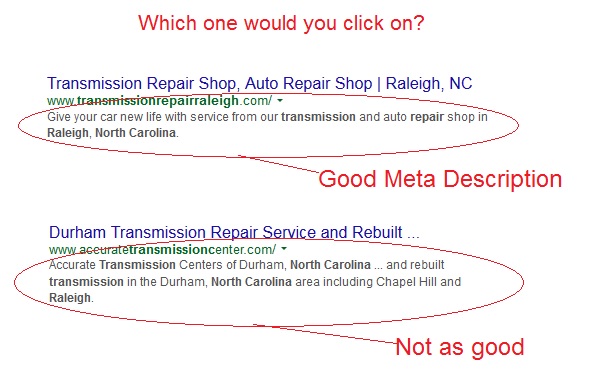
How to write a great meta description:
- Make it descriptive and short – no more than 160 characters.
- Be persuasive
- Make it catchy and to the point
- Don’t stuff your descriptions with keywords
- Make people curious (insert “FREE …” to encourage people to click and find out exactly what is free).
- Highlight power words with capital letters
- Think of the meta description as your organic ad text. Optimize it as you’ll do for Ad description.
- Include an offer or call to action to entice a click.
- Use synonyms or LSI keywords.
- Write it as if you would write welcome text.
- Add your brand name if needed.
- You can also use numbers, emojis etc to increase CTR.
- Make it readable to the user.
- Make sure to create a unique description for each page.
- Optimize it for higher CTR.
- Stand out from your competitors, appealing to your visitors.
- Avoid Click Bait Descriptions.
For WordPress users, you can use WordPress SEO plugins like Yoast or All-in-One SEO Pack to write meta descriptions.
GOOD: Best Wireless Routers (2018) | Buyer’s Guide and Reviews
BAD: Best Wireless Routers | Buy Wireless Routers | Wireless Routers 2018
URL Optimization
Let’s start with the domain name. There are three types of domain names you can register. They are Exact Match Domain, Partial Match Domain, and Branded Domain.
What is an Exact Match Domain(EMD)?
An Exact Match Domain uses the exact keyword for the domain name. For example, www.rooferscalgary.com, roofing-calgary.com etc.
EMDs still work in 2018 but is little riskier coz there is a higher chance of getting hit with over-optimization penalties. But if you optimize it properly then there is a chance for it to rank higher than other branded or partial match domains.
What is a Partial Match Domain(PMD)?
A Partial Match Domain uses the target keywords but adds additional words between or around them. For example, quickroofingcalgary.com, quickroofersincalgary.com etc.
What is a Branded Domain?
Branded domains include none of the target keywords in the domain name. They are used by real businesses(real sites) who looking to build a brand.
Google loves branded domains like Wikipedia.com, Amazon.com, Traffitise.com etc. Branded domains are great for a long-term strategy.
I would go with EMD or PMD most of the time if I am building my niche, local or affiliate sites. But when building a real business or product I’ll go with branded domain.
So let’s talk about URL Structure.
A study from Ahrefs found that shorter URLs tend to rank better. Shorter URLs seem to perform better in search engine results, however, that is not the only factor. Google has stated that the first 3-5 words in a URL are given more weight. The shorter the URL, the easier it is to share or embed while creating a better user experience. You want your readers to quickly identify what your page is about without seeing numbers, categories, symbols, or a mixture of everything included in the string.
For example, http://traffitise.com/on-page-seo/ would perform better than http://traffitise.com/blog/category/seo/on-page-seo etc.
“More folders can create a perception of depth for both engines and users, as well as making edits to the URL string considerably more complex.” – Rand Fishkin of Moz
How to Optimize Your URLs in WordPress:
- Keep your URL short, concise, and easily readable & crawlable.
- Always include your target keyword in your URL.
- Avoid using special characters, symbols, brackets, commas, etc. within the actual URL.
- Use dashes instead of underscores to differentiate the strings in your URL structure.
- Don’t let your URL string sound unnatural or forced with keywords.
- Include LSI keywords
- Make use of Breadcrumbs for better navigation.
When you have two pages displaying almost the same content or information, set up a 301 redirect or canonicalization tag (rel=canonical) to the stronger page. This avoids duplicate content and shows Google which page to rank.
Mobile Friendly (Responsive)
More than 50% of users are spending their time browsing and searching on mobile devices over desktops. Today most of the searches are done through mobile devices.
Google’s Mobile-Friendly algorithm has penalized lots of mobile unfriendly sites. Google prefers responsive websites. Responsiveness is not a direct ranking factor but it is great for user experience. And we know that user experience is a huge ranking factor.
If you’re using modern WordPress themes then there is a high chance for your website to be mobile friendly. Most of the WordPress themes these days are mobile responsive.
Google is giving more importance to mobile users in the recent time. They have come up with Accelerated Mobile Pages (AMP) in order to continue to provide users with the fastest and best experience. AMP implemented web pages loads super fast. The faster the load time, the more appealing it is for mobile users.
A mobile-friendly website should:
- Be easy to read & navigate
- Be optimized or have limited multimedia
- Have easy access to your contact information
- Be optimized for users
- Look good on mobile devices’ small screens
- Load fast enough
- Use appropriate call to actions
- Avoid huge images and complicated scripts
- Make sure font size is readable
- Be able to load properly
- Avoid using Flash for example
- Be connected with your desktop
- Have app-like experience
How do you make your website mobile friendly?
Use Mobile Plugins on Popular CMS Platforms like WordPress or Wix or Squarespace.
How do I know that if my website is mobile friendly?
You can check to ensure your website is mobile friendly through Google’s test tool:
https://testmysite.thinkwithgoogle.com/
Page Speed Optimization
Nobody likes a slow loading website. They are irritating as hell.
Page loading speed is an SEO ranking signal(not a huge one but affects rankings). It helps when your site is faster than your competitors’ site. But if your page isn’t loading right away then your site visitors (potential customers) might go to your competitors.
Your site needs to be faster than your that of your competitors to keep visitors happy and engaged which ultimately help increase your conversion rate.
From SEO standpoint, a slow page speed means that search engines can crawl fewer pages using their allocated crawl budget, and this could negatively affect your indexation.
“More than 50% users will leave your site if it doesn’t load within 4 seconds. Your site shouldn’t take more than 4 seconds to load.” – Backlinko
“58% of mobile users expect your mobile site to load as fast, if not faster, than the experience seen on a desktop.” – Kissmetrics
The study by Ahrefs shows that most top ranking result loads in 0.7 seconds or less.
Here are some of the many ways to increase your page speed:
- Switch to Faster Hosting (For e.g. WPEngine)
- Leverage Browser Caching
- Use GZIP Compression
- Clean Up HTML & CSS Coding
- Improve server response time
- Delete Unused Plugins
- Don’t use heavy plugins
- Don’t use heavy WordPress themes
- Minimize Redirects
- Resize & Compress Images
- Use Content Delivery Network
Tools that I use to keep my site speed fast:
- Gooogle Page Speed Insights
- GTMetrix (Page Speed Checker)
- Pingdom (Page Speed Checker)
- Mobile Website Speed Testing Tool
- W3 Total Cache (WordPress Caching Plugin)
- WP Smush (Image Compressor)
- Photoshop (Resizing Image)
- WP-Optimize (WP Plugin to Optimize Database)
- Cloudflare/MaxCDN (Content Delivery Network)
Image Optimization
Blog Post without images looks boring. Images make your site visually appealing. They play a crucial role in user experience and conversions.
“The vast majority (70%+) of pages that rank in Google top 10 don’t have the target keyword in the “alt” tags of their images. And actually, over 50% of all pages that we saw in Google top10 didn’t have their alt tags filled in.” – Ahrefs
Search engine crawlers cannot identify what the image is about. So, you should use “Alt” tag to describe what’s on the image. It is something that people will see when the image won’t load. Don’t stuff your keywords into alt tags. Make your alt tags descriptive, unique, relevant and meaningful.
You can use WordPress Plugins like Yoast to optimize your images for SEO.
How to Optimize Images for SEO
-
- Include your target keyword in your file name
- Alt tags and title should be descriptive and unique
- Include relevant keywords in alt tags and titles
- Make use of captions
- Use Descriptions for your images if needed
- Don’t stuff keywords in your alt tag, title etc.
How to Optimize Images for Better Conversions:
- Size(Scale) and Compress Images for better loading
- Make sure the image is of high quality
- Make use of graphics to make it look catchy
- Use text on images to describe what it’s about
- Make use of GIF Images to make it visually appealing
Internal Linking (Interlinking)
Interlinking is as much important as getting links from quality sources and authority sites.
Brian Dean from Backlinko recommends linking to 2-5 older posts whenever you publish a new one.
Interlinking helps your audience stay(spend) more time on your blog, and it will also help pass authority and link juice(page rank) to other pages of your site.
When interlinking, try to use a keyword as the anchor text. It helps to build the relevancy but be very careful not to overdo it. You can use LSI keywords to avoid over-optimization penalty. Also, don’t put an internal link in every sentence.
Always make sure your interlinking is relevant.
Internal linking makes it much easier for your visitors and search engine crawlers (they follow links) to navigate around your site and find all of your content. Linking internally between the pages helps improve the crawlability, rankings, usability, lower bounce rate and most importantly, great user experience, more engagement, and traffic.
There are a number of different methods that you can use to improve your internal linking structure. The main being; content links and permanent navigation links.
Content or contextual links carry more weight than the links from the navigation menu, sidebar, footer etc.
Internal Linking Best Practices
- Always make sure your interlinking is relevant.
- Add links whenever it would be helpful to readers.
- Don’t Drive Away from the Main Point (Apple linking to Gold)
- Don’t put too many links
- Utilize Anchor Text
- Use LSI keywords for anchor text variation
- Avoid non-contextual anchor text such as “Click here” or “Read more”
For more on Internal Linking you can check: